Skip to content

Accessories

Accessories for signalling, charging and power

Accessories turn location into action and make deployments practical: a light and tone that react to where tags are, a charger for a whole shift of badges, and a box that runs a base station (UWB anchor) without cables.

What each one is for

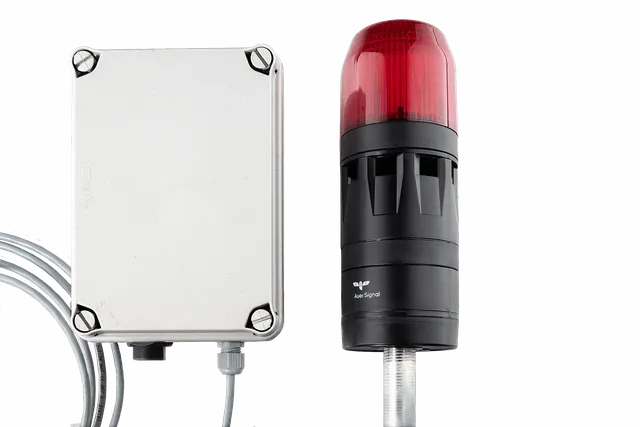
Signalling Flash

Light and sound where the risk is

A rule in the Workflow Manager decides when the Signalling Flash switches on: a forklift approaching a crossing, a person entering a high-voltage test area, or a workstation waiting for material. A controller powered over Ethernet drives the signal unit, with selectable LED colours, flashing modes, tones and volume.

Signalling Flash specifications

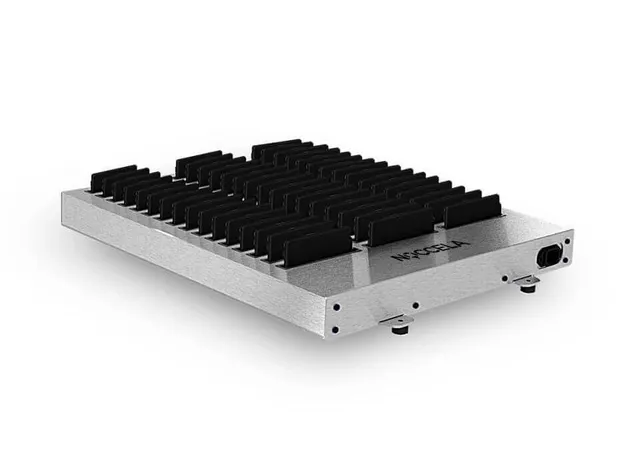
ID Badge Charging Dock

Every shift starts charged

The Charging Dock holds 48 ID Badges. Placed at a clock-in gate or shift-change point, it doubles as the place where badges are returned, so nobody starts a shift with a flat badge and pool badges for visitors and contractors stay in one place.

ID Badge Charging Dock specifications

Extension Box

A base station anywhere

The Extension Box powers a base station from a USB-C power bank and connects it over Wi-Fi to a local or LTE router. Use it for demos, trials, events, sports sessions and construction sites where there is no cabling.

Extension Box specifications

Compare accessories

Comparison of Noccela accessories
Signalling Flash ID Badge Charging Dock Extension Box
What it does Location-triggered light and tone for zone warnings and andon status.48-slot charger for ID Badges at shift change and clock-in gates.Run a base station (UWB anchor) from a power bank over Wi-Fi: no cabling needed.
Power Power over Ethernet, about 2.3 W total100–240 V AC, 50/60 HzAbout 6 W
Connection Ethernet to the controller (PoE)–Wi-Fi to a local router or LTE router
Size Controller 120 × 165 × 75 mm, PoE; signal unit 70 × 260 mm, tube mount540 × 440 × 60 mm119 × 66 × 36 mm
Weight About 0.75 kg5.8 kgAbout 0.5 kg
Mounting Signal unit on a tube mountTable or wallZip tie, adhesive or tripod
Operating temperature 0 to +50 °C–0 to +50 °C
Certifications CE markedCE markedContact us for certification details

How to set up a zone warning

The Signalling Flash is the accessory that needs the most planning. A typical set-up takes four steps.

  1. Choose the spot

    Mount the signal unit where people and drivers will see and hear it, for example at a crossing or the entrance to a test area.

  2. Connect it

    Run one Ethernet cable from a PoE switch to the controller. The controller powers the light and tone unit.

  3. Draw the zone

    On the map in the Location Intelligence Platform, draw the zone that should trigger the warning.

  4. Set the rule and test

    In the Workflow Manager, choose which tags trigger the flash and how it signals, then walk or drive a tag through the zone to test.

Frequently asked questions

How is the Signalling Flash triggered?
By rules in the Workflow Manager of the Location Intelligence Platform, for example when a tagged forklift enters a zone. The same rule can also alert people on their ID Badges or send an event to your own systems.
Can the Signalling Flash show andon status?
Yes. Mounted at a workstation, it can show andon status in lean production, for example together with the location-aware Andon Button.
Where should the Charging Dock go?
Where badges are handed out and returned: a clock-in gate, a shift-change point or a visitor reception. It stands on a table or mounts on a wall and runs on 100–240 V AC.
Which power banks work with the Extension Box?
Any USB-C power bank that delivers 5 V and at least 2 A. How long the base station runs depends on the capacity of the power bank.
Is there a portable warning kit for temporary zones?
Yes. The Mobile Anchor with Flash combines a base station, a Signalling Flash, a battery and a 4G router in one case.

Put location to work on your site

Tell us where you need warnings, how your shifts change and where cabling is hard. We will suggest the accessories that fit.