Base stations
Base stations (UWB anchors) that calibrate themselves
Base stations are the fixed part of a Noccela system. They measure the radio signals of the tags, give the positioning engine what it needs to compute positions, and work out their own positions after installation. Indoors they go up like security cameras, on one cable each.
- Positioning accuracy, up to
- 10 cm
- Coverage per base station, up to
- 500 m²
- Active tags at 1 Hz within radio range
- 1,000
- Data and power over Ethernet (Beacon 3)
- 1 cable
What a base station does
Satellite navigation works because the satellites are at known positions. Indoors, base stations play that role. Each one is fixed at a known point. When a tag sends an ultra-wideband (UWB) pulse, the base stations in range measure it, and the positioning engine calculates where the tag is.
Noccela's High-Performance Ranging (HPR) protocol also gives the base stations a two-way link to the tags. The link is used to configure tags, update their firmware over the air and switch on their buzzer and LED.
The base stations themselves are kept simple. The demanding computing runs in the positioning engine, in Noccela's cloud or on your own server.
-
Measures
Ranges with every tag in reach and sends the measurements to the positioning engine.
-
Locates itself
Measures its distance to the other base stations, so the system knows where every base station is.
-
Talks back
Configures tags, delivers firmware updates and triggers warnings on badges.
Installed like a security camera
Indoor base stations use the same kind of installation as IP cameras: one network cable each, from a PoE switch.
- One cable for data and power. Beacon 3 is powered over Ethernet and draws about 3 W.
- Standard mounting. A ceiling bracket or an M10 threaded bar indoors; poles, fences or tripods for the Sports Beacon.
- No special network set-up. No public IP address, no static IP address and no access to your private network.
- Forgiving placement. Base stations go where cabling and mounting are practical; automatic calibration takes care of their exact positions.
- No cabling at all? The Mobile Anchor with Flash runs on its own battery and 4G router; the Extension Box runs a base station from a power bank over Wi-Fi.
One Ethernet cable each
Automatic calibration
In many RTLS installations, the position of every anchor is surveyed by hand after mounting. That takes time and adds error. Noccela base stations do it themselves.
After installation, a technician measures the position of two base stations. The other base stations measure their distances to each other over UWB, and the system calculates where each of them is.
Sports set-ups go further. The Sports Beacons are placed around the field and calibrated by walking a tag to its corners, with no floor plan and no surveyed base stations.
Coverage and capacity
Up to 500 m² per base station
How much area one base station covers depends on the space. Open halls need fewer base stations than areas with high racking, walls or heavy machinery, and ceiling height matters too. Coverage areas overlap, because a tag is positioned from the measurements of several base stations.
1,000 active tags at 1 Hz within radio range
Tags that are not moving go to sleep, thanks to their accelerometer, and do not use capacity. A site can therefore have many more tags than this in total. A tag that reports its position more often than once a second uses more capacity; one that reports less often uses less.
Choose your base station
Three models for permanent indoor sites, open and outdoor areas, and temporary zones.
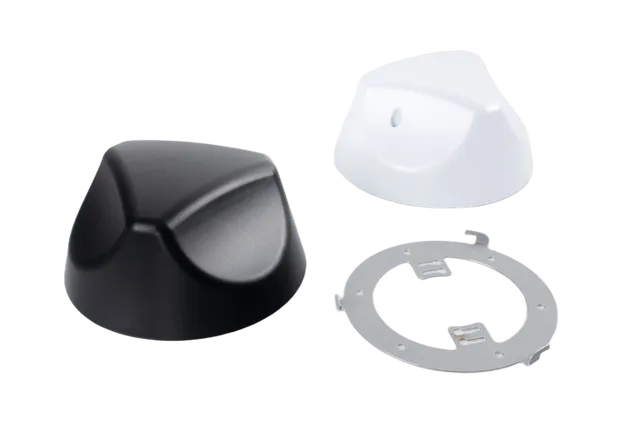
Beacon 3
Compact PoE base station for indoor sites, installed like a security camera.
Details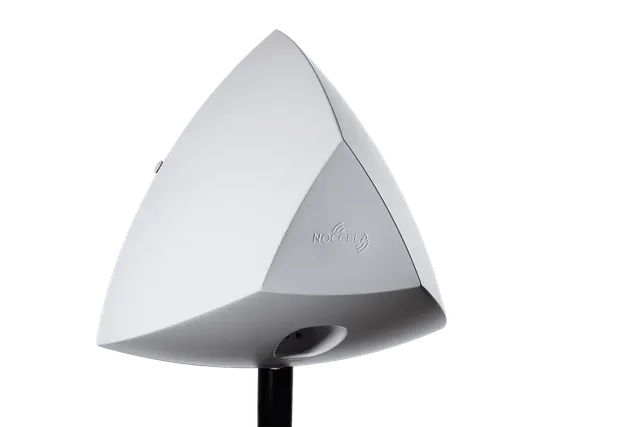
Sports Beacon
Rugged base station for sports fields, outdoor areas and harsh industrial sites.
Details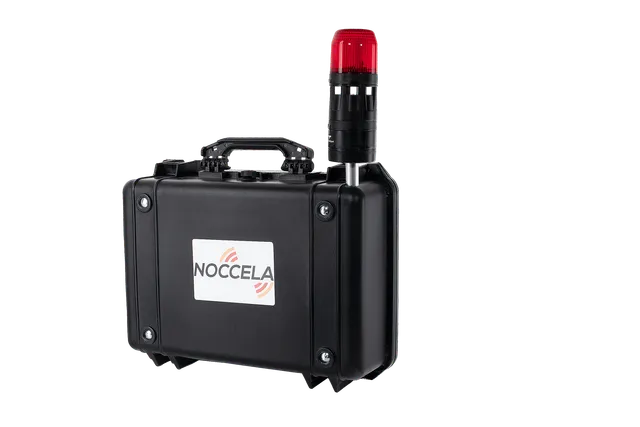
Mobile Anchor with Flash
A base station, signalling flash, battery and LTE router in one rugged case.
DetailsCompare base stations
| Beacon 3 | Sports Beacon | Mobile Anchor with Flash | |
|---|---|---|---|
| Best for | Factories · Warehouses · Hospitals · Offices | Sports fields and arenas · Equestrian tracks · Outdoor yards · Harsh industrial sites | Temporary hazard zones · Test benches and vehicles · Construction and maintenance · Events and exhibitions |
| Environment | Indoor | Indoor and outdoor | Portable kit for temporary zones |
| Coverage | Up to 500 m² per base station | Up to 500 m² per base station | A zone around the case |
| Tag capacity | 1,000 active tags at 1 Hz within radio range; unlimited parked tags | 1,000 active tags at 1 Hz within radio range | – |
| Power | Power over Ethernet, about 3 W | USB-B power, about 3 W | About 11 W; rechargeable battery or 100–240 V AC |
| Network | 10/100 Mbps Ethernet (RJ-45) | Ethernet; Wi-Fi with the Extension Box | 4G LTE router with SIM slot |
| Mounting | Ceiling bracket or M10 threaded bar | M10 threaded bar: pole, fence or tripod | Free-standing case |
| Size and weight | Radius 75 mm, height 70 mm; 190 g | Radius 180 mm, height 250 mm; 1,250 g | 465 × 360 × 175 mm, about 6.5 kg complete |
| Operating temperature | 0 to +50 °C | 0 to +50 °C | 0 to +50 °C |
| Certifications | CE marked; FCC ID 2AVRO-BEACON-3 (47 CFR Part 15 Subpart F; indoor use in the US) | CE marked | Built from CE-marked Noccela components |
How to deploy base stations
-
Plan from your floor plan
Upload the floor plan to the Designer. It suggests base station positions, and a Noccela engineer reviews them with you.
-
Cable and mount
Run one Ethernet cable from a PoE switch to each base station and mount it on a bracket or threaded bar. Cabling is usually most of the work.
-
Measure two, calibrate the rest
Measure the position of two base stations. The others locate themselves by ranging each other over UWB.
-
Validate and go live
Walk a tag through the area to check accuracy and coverage, then set up the Location Intelligence Platform and connect your systems.
Frequently asked questions
Is a base station the same as a UWB anchor?
How many base stations does a site need?
Do we need to survey every base station after installation?
What do base stations need from our IT network?
Can base stations be used outdoors?
What if there is no cabling at all?
Plan your base station layout
Send us a floor plan. We will tell you how many base stations you need, where they go and what the installation involves.